

A Google Ads daily budget is an average for the month, not a hard stop for the day. The help pages Google publishes for advertisers say a campaign can spend up to twice its average daily budget on a single day, and that across a month you won’t be billed more than 30.4 times that daily figure. So if you set $25 and yesterday cost $47, the account most likely did exactly what Google says it does. The real question is whether the month is still on track, and that takes about ten minutes to check.
TL;DR
A Google Ads daily budget sets an average, and two limits sit around it. The daily spending limit is twice the average daily budget for most campaigns, so a $25 budget can bill up to $50 on a busy day. The monthly spending limit is 30.4 times the average daily budget, so the same $25 budget can’t bill more than $760 in a month. A day that costs more than the daily budget is normal pacing.
Changing the budget mid-month resets the monthly limit to what’s been spent plus the new budget times the days left, including the day of the change. Clicks Google later judges invalid are filtered out or credited. The budget report and the Billed cost report in the account show whether a bill is inside those limits. Need your Local Services Ads managed for you? See our Google Local Service Ads management.
What Does a Google Ads Daily Budget Actually Limit?
A Google Ads daily budget limits the average, measured over the month. The official definition calls it “how much you are roughly comfortable spending each day over the course of the month.” The word that matters there is roughly. On any one day, the system is allowed to go higher or lower, and it’s built to.
The reason is stated plainly in the help center: the system will spend more “for days of the month when you’re more likely to get clicks and conversions,” which means “on some days you might not reach your average daily budget, and on others you might exceed it.” Two ceilings keep that swing in check, and the Google Ads Help page on spending limits defines both.
| Limit | How Google calculates it | On a $25 example budget |
|---|---|---|
| Average daily budget | The number you type in | $25 |
| Daily spending limit | 2 times the average daily budget, for most campaigns | $50 on any one day |
| Monthly spending limit | 30.4 times the average daily budget, for most campaigns | $760 in a calendar month |
The $25 is our example figure, picked to make the arithmetic easy to follow, and we’re not suggesting it as a spend. If you’re still working out how much a Plano business should put into advertising at all, our DFW digital marketing playbook lays out the budget levels we talk through with owners.
Where does 30.4 come from? Google divides 365 days by 12 months.
That same figure is used for every month, short or long, which matters later in this article.
Note the qualifier “for most campaigns.” Google lists exceptions. A “Pay for Conversions” campaign has no daily spending limit at all, though it still stays inside the monthly one. A campaign total budget, covered further down, works differently again.
October on a $25 Budget, Day by Day
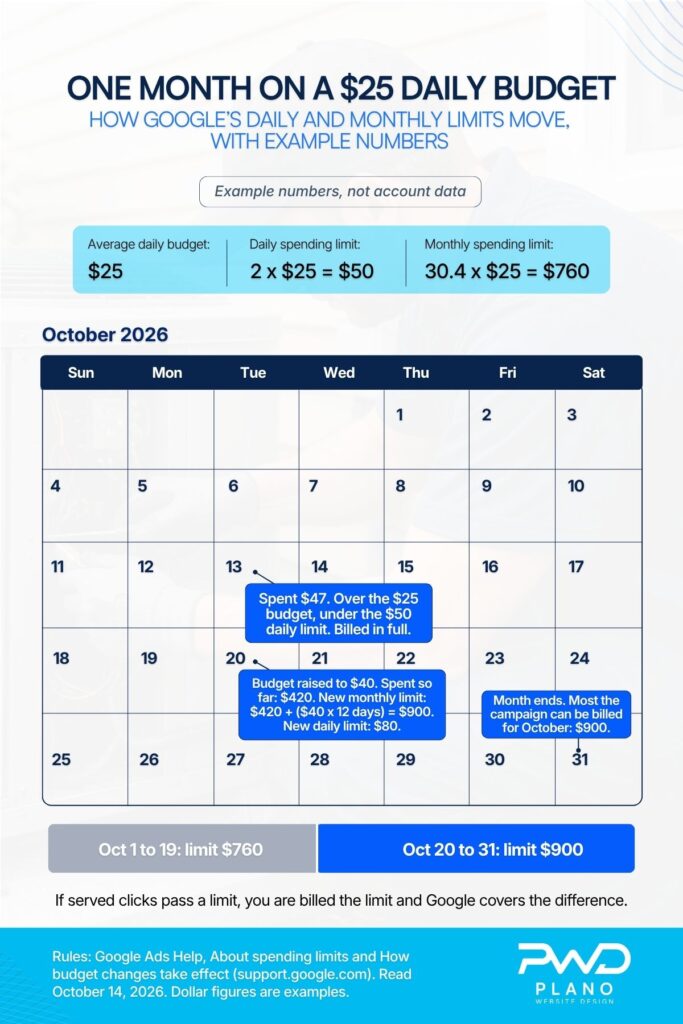
Here is one month walked through with the arithmetic from the Google Ads Help page on managing your spend and its companion pages, and nothing else. Every dollar figure below is an example we made up to show the formulas working. None of it is account data from a real Plano business.
The setup: a Plano home services company starts in October 2026 with one Search campaign at a $25 average daily budget. It runs every day of the month.
| Date (example) | What happens | Daily limit that day | Monthly limit after this point |
|---|---|---|---|
| Thursday, October 1 | Campaign set at $25 a day | $50 | $760 |
| Tuesday, October 13 | A busy day: clicks cost $47 | $50 | $760 |
| Monday, October 19 | End of day: $420 spent month to date | $50 | $760 |
| Tuesday, October 20 | Budget raised to $40 that morning | $80 | $900 |
| Saturday, October 31 | Last day of the month | $80 | $900 |
The $47 day
On October 13, the campaign billed $47 against a $25 budget. That’s 88% over the number the owner typed in, and it’s still inside the $50 daily spending limit, so the whole $47 is billable.
Nothing broke. The system read the day as one worth spending into.
The figure worth checking is the month-to-date. If the campaign is pacing toward $760 or less for October, the overspend day was borrowed from quieter days and the month still lands where the budget says it will.
The October 20 change
On the morning of October 20, the owner raises the budget to $40 because the phones are busy. The rule for a mid-month change is month-to-date spend plus the new average daily budget times the remaining calendar days, counting the day of the change. October 20 through October 31 is 12 days.
That gives $420 + ($40 x 12) = $900 as the new October ceiling. The daily spending limit for the rest of the month becomes $80, which is twice the new budget.
Why the month isn’t 31 times the budget
October has 31 days, but the monthly limit is still 30.4 times the daily figure. At $25 a day for the whole month, $760 spread over 31 days works out to about $24.52 a day on average. In February, the same budget’s $760 limit is spread over 28 days, about $27.14 a day. Owners who compare one month’s invoice with another’s sometimes read that difference as a pricing change, when the 30.4 rule explains all of it.
Why Did Yesterday Cost More Than the Budget?
Most days that run over the budget fall into one of four patterns. The help pages describe each of them, and none of them breaks the two limits above. The table maps what you see on the invoice to the cause and to the place in the account where you can confirm it.
| What you saw | The usual cause | Where to confirm it |
|---|---|---|
| One day up to 2x the budget, the rest of the week lower | Normal pacing toward busier days | Budget report, daily spend bars |
| Every active day above the budget | An ad schedule that runs only some days | Campaign settings, ad schedule |
| A big day on the same day someone edited the budget | Daily limit set by the highest budget that day | Budget report, the arrow on that date |
| One campaign spending well over its share | A shared budget moving money between campaigns | Shared budgets, under Budgets and bidding |
An ad schedule that only runs on weekdays
This one matters to any Plano or Allen business that only runs ads during office hours. If a campaign uses ad scheduling, Google says the monthly spending limit “will continue to be 30.4 times your average daily budget,” and the system “will pace to reach this full monthly limit regardless of how many days the campaign is scheduled to be active.”
October 2026 has 22 weekdays. A $25 campaign scheduled Monday to Friday can still pace toward the full $760, which averages about $34.55 on each day it runs. Every weekday can sit above the $25 you set, and the invoice can still be inside the rules, because the daily cap is still $50.
Someone changed the budget during the day
The help page on how budget changes take effect says the daily spending limit on the day of a change is based on “the highest average daily budget that you chose for that day.” So if the $25 budget is raised to $40 at 9 a.m. and set back to $25 at noon, that day’s ceiling is $80, not $50.
The monthly limit works the other way. It “only considers the latest average daily budget.” The same page adds a catch that trips people up: changing a campaign’s end date “is considered a budget change” for working out what you’ll pay in that month.
A shared budget feeding three city campaigns
Plenty of DFW accounts run one campaign per city, say Plano, Frisco and Allen, so the ads and landing pages can name the town. Shared budgets let several campaigns draw on “a single average daily budget.” The shared budgets help page says underused budget is reallocated to campaigns that are limited by budget. On a quiet day in Allen, the Plano campaign can take the money Allen didn’t spend.
That reads as an overspend if you’re watching campaigns one by one. Look at the shared budget’s total instead. There’s also a timing quirk in Google’s shared budget instructions: switching campaigns into or out of a shared budget in the middle of the day starts serving “as though the campaigns have spent $0 up until that point.”
What Happens When the Clicks Cost More Than the Limit?
You won’t be billed above either limit, even when the served clicks add up to more. Two numbers sit side by side in the account. Served cost is the cost of every click and impression the campaign got. Billed cost is what you actually owe after adjustments. When served cost passes a limit, Google says “you’ll never pay more than these two limits” and “Google will cover the difference.”
Here’s how that looks on our example budget. Say a heavy Friday in Frisco racks up $56 of served clicks on the $25 campaign, past the $50 daily ceiling. The billed cost for that day is $50, and Google absorbs the other $6. The same logic applies at the month level against the $760 limit. Google’s own help page uses a $10 budget for its version of this example; ours is scaled to the $25 campaign so the calendar stays consistent.
The help center describes this as rare. The systems are designed to stop showing ads at the limit, and the gap happens when they “won’t detect discrepancies right away.” If the month ends over the monthly limit, Google’s “Manage your spend” page says “an overdelivery credit will be applied to your account.”
Invalid clicks come off the bill
A separate adjustment covers clicks that were never real interest. The invalid traffic help page lists accidental clicks, bots and automated software, and manual clicks meant to run up your costs, including clicks by competitors. Its rule for advertisers is short: “You won’t be charged for invalid clicks or impressions.”
Most of it is caught before the invoice and simply never shows up in your clicks or cost. Some takes longer to find. When Google spots invalid activity after you’ve been billed, a credit appears in the next billing cycle, labeled “Invalid activity” under Adjustments on the Billing Summary page.
- Open Campaigns and add the Invalid clicks column to see what was filtered out.
- Open Billing, then Summary, and check the Adjustments list on the month card.
- Look for “Invalid activity” lines, which are credits for clicks billed earlier.
If a single day looks wrong and invalid clicks are high on that same day, the system has already caught part of it. A rising count there means filtering caught more, and those clicks are off your bill.
When You Need a Ceiling That Doesn’t Move
A fixed event needs a fixed number. Google Ads has a campaign total budget for exactly this: a set amount over a set period. The help page calls it “a hard cap for the total duration of the campaign.” There’s no 2x daily limit. The system spends more or less on each day to use the total by the end date.
The trade-offs are worth knowing before you plan around one:
- The period runs from 3 to 90 days for Search, Shopping, and Performance Max campaigns.
- You can’t switch an existing campaign over. A total budget needs a new campaign.
- Google recommends keeping edits to a minimum once it starts, because changes can make spend uneven.
A McKinney retailer running a ten-day holiday sale is the kind of case it fits. A Dallas plumbing company that wants calls all month usually fits an average daily budget better, watched by the month.
Microsoft Advertising counts the month differently
If you also run ads on Bing, don’t assume the same arithmetic. Microsoft Advertising’s developer guide, “Budget and Bid Strategies“, says “Your budget is a target; your actual spend might be higher or lower,” and that it “usually keeps overspend to less than 100% above your daily limit.”
Its monthly figure is the daily budget times the number of days in that month, not 30.4. So the same $25 example budget has a $775 October ceiling on Microsoft and a $760 one on Google. For a change after the first of the month, Microsoft’s formula is the same shape as Google’s: month-to-date spend plus the daily budget times the days left, including today.
Four Screens to Open Before You Call Anyone
These four checks answer most “why did it spend that” questions. Work through them in this order, because each one rules out a cause before the next.
None of them needs a support ticket.
1. The budget report
Hover over the campaign’s budget in the Campaigns view and select View budget report. At the top you’ll see the monthly spending limit, Google’s monthly forecast, and cost to date. The chart shows cumulative spend against a gray line for the limit. Budget changes show as arrows on the days they were made.
If cost to date plus the forecast sits under the limit, the month is fine, whatever yesterday looked like. One exception: Performance Max campaigns don’t work with this report.
2. The Billed cost report
Open “Insights and reports”, then Report editor, then the Billing section of the Template gallery, and choose Billed cost. Subtract billed cost from served cost for each day. Any positive gap is overdelivery that Google covers.
3. Invalid clicks and adjustments
Add the Invalid clicks column if it isn’t already on your campaign table. Then check the Billing Summary for “Invalid activity” adjustments, as in the steps above.
4. The campaign settings that move spend
Last, open the campaign settings and read four lines:
- The ad schedule. If it’s weekdays only, expect the active days to run above the average.
- The budget type: shared, individual, or campaign total, and which campaigns share it.
- The end date, because a recent edit there counts as a budget change.
- Location options. The broad setting, “Presence or Interest”, can reach people who aren’t in Plano or Frisco but “have shown an interest in” them. The “Presence” option keeps ads to people in those places.
The location setting does not affect the spending limits. It decides whose clicks the money went on, which is often the real complaint behind an overspend question. Seasonal businesses feel all of this at once. We wrote about getting an HVAC company found before the first cold front, and the ad side of that season follows the same pacing rules described here.
Check the Monthly Limit Before You Cut the Daily Budget
Open the budget report before you touch the budget. If the month is pacing within its limit, a $47 day on a $25 budget is the system working as Google documents, and reacting by cutting the budget can starve the busy days that bring in calls. If the month is heading past the limit, check the Billed cost report, because you won’t be charged for the overage.
When the pattern doesn’t fit any of the four causes above, it’s worth a second pair of eyes. Our page on PPC management for Plano and Frisco businesses explains how we set up, manage, and report on Google Ads campaigns. For leads that are charged by the lead instead of the click, our guide to Google Local Service Ads covers how that product’s weekly budget works, and our older notes on Plano PPC trends give the wider picture. Or tell the team at Plano Website Design what you saw on the invoice when you request the free consultation listed on that PPC page.