

The Boost button buys a real Meta ad, built from a post you already published, with several settings chosen for you or left out. A campaign in Ads Manager runs on the same ad system and hands those settings back. Meta says it plainly on its own help page: boosted posts “don’t have as many customization and detailed targeting options as a traditional Meta ad.” Neither one is cheaper by design. You set the budget either way, so the choice comes down to which settings your goal needs.
TL;DR
The boosted post vs Facebook ad question has a short answer from Meta itself: a boosted post is an ad, it is billed as an ad, and it goes through the same review. What changes is control. The Boost form asks for a goal, an audience, a duration, a daily budget and placements, and it fills the creative from the original post. Ads Manager splits the goal into a campaign objective, a conversion location and a performance goal, and adds formats, placements and audience tools the Boost form does not show.
Boosting from the Facebook or Instagram iPhone app can add an Apple service fee on top of the ad spend. Results for a boost live in Ad Center, labeled by the goal you picked. Tag every link in the ad, so Google Analytics can tell paid clicks from free ones.
Is a Boosted Post Really an Ad?
Yes. In Meta’s own wording, a boosted post “is an ad you create from an existing piece of content (e.g., posts, Stories, Reels) you published on your Facebook Page or Instagram account.” The same page adds that when your bill arrives, “your boosted post will be identified as an ad.” That is the line we send owners to first: Meta’s help page on the difference between boosted posts and Meta ads.
So the decision is never paid versus organic. Both choices spend money in the same auction. The question is how much of the setup you want to hand to Meta.
| Boosted post | Campaign in Ads Manager | |
|---|---|---|
| Is it an ad? | Yes, “still considered an ad” | Yes |
| Shows on your bill as | An ad | An ad |
| Starts from | A post, Story or Reel you already published | A new ad, or an existing post you select |
| Where you build it | Your Page, Instagram profile or Meta Business Suite | Ads Manager, on a computer or the Ads Manager app |
On Instagram, the boosting help page says an ad is reviewed against Meta Advertising Standards and that “most ads will be reviewed and start to run within the hour.” It makes no exception for boosts, which is one more sign the two are the same product underneath.
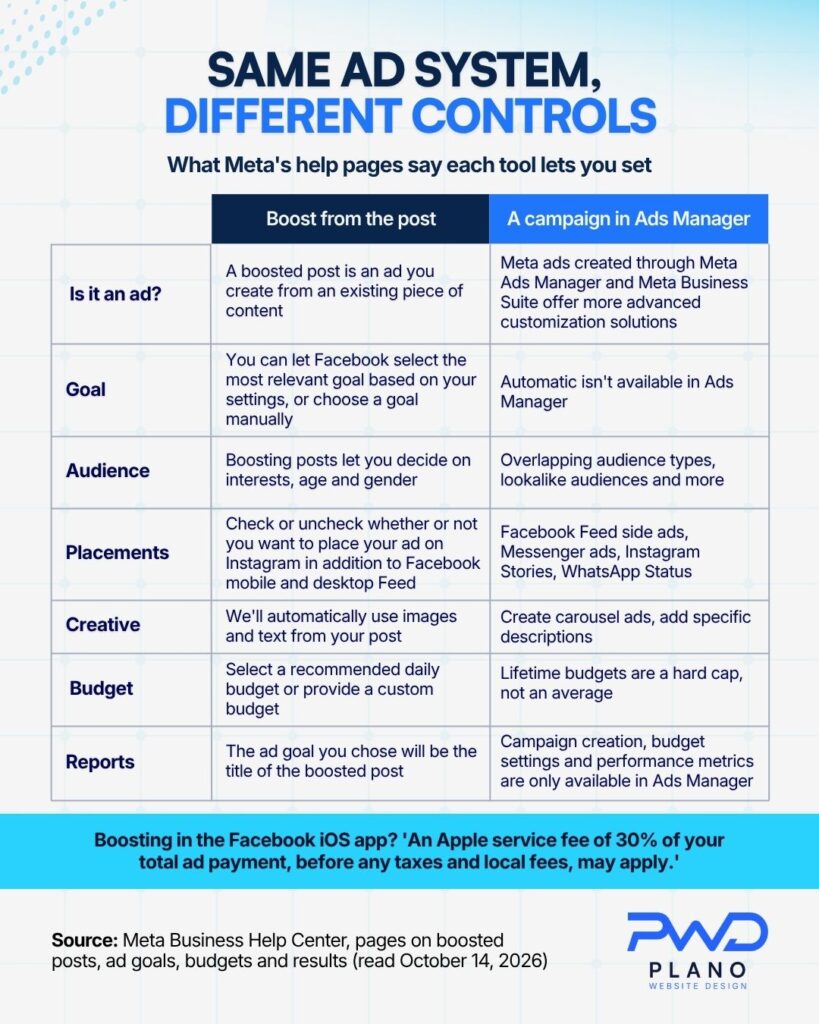
What the Boost Form Asks You to Decide
Open Boost on a Facebook post and the form walks you through a fixed list. Meta’s step-by-step page for boosting from a Facebook Page (https://www.facebook.com/business/help/347839548598012) names every field, and it says “We’ll automatically use images and text from your post.” Here is that list next to what Ads Manager does with the same decision.
| Decision | Boost form, in Meta’s words | Ads Manager |
|---|---|---|
| Goal | “You can let Facebook select the most relevant goal based on your settings, or choose a goal manually.” | Three settings: campaign objective, conversion location, performance goal |
| Audience | “Choose an Advantage+ recommended audience or create a new audience based on specific traits.” | Adds “overlapping audience types, lookalike audiences and more” |
| Creative | Text and images come from the post; Advantage+ creative can be turned on | Build the ad from scratch, including carousel ads |
| Duration | “Select one of the suggested time frames or provide a specific end date.” | A schedule, plus budget raised on “specific days and times” |
| Budget | “Select a recommended daily budget or provide a custom budget.” | Daily or lifetime budget, at campaign or ad set level |
| Placements | “Choose where you want your ad to appear.” | The full placement list |
| Special Ad Category | Switch on for financial products and services, employment, housing, or social issues, elections or politics | Selected when the campaign is created |
The rows that matter most for a small business are the first three. The goal decides what Meta tries to get for your money, and the audience decides who it tries to get it from.
Goals on the button, objectives in Ads Manager
The Boost form calls them goals, and they read like plain English: get more messages, get more website visitors, get more calls. According to Meta’s page on ad goals and Ads Manager settings, each of those goals “bundles several Ads Manager campaign settings into one simple choice so you don’t have to configure them yourself.” It also notes that a goal may be set to Automatic by default, and that “Automatic isn’t available in Ads Manager.”
| Goal on the Boost form | Ads Manager objective | Conversion location | Performance goal |
|---|---|---|---|
| Get more messages | Traffic, Engagement, Leads or Sales | Messaging apps | Conversations |
| Get more website visitors | Traffic, Engagement, Leads or Sales | Website | Link clicks |
| Get more calls | Traffic, Engagement, Leads or Sales | Calls | Calls |
| Get more post engagements | Engagement | On your ad | Post engagement |
| Get more leads | Leads | Instant forms | Leads |
Ads Manager’s full menu has six objectives: Awareness, Traffic, Engagement, Leads, App promotion and Sales. Meta’s objective guide describes Sales as a way to “find people likely to purchase your goods or services.”
One honest caution. Meta’s own pages do not describe boost goals the same way. The comparison page says a boosted post “may initially optimize for Page likes, comments and shares or overall brand awareness.” Meta’s separate page about boosted posts says boosting “can help you get more messages, video views, leads or calls.” Both are on the Business Help Center today. We trust the goal list on your own Boost screen over either summary, because that list is what the ad will actually be built on.
Audience choices on each side
Meta’s comparison page says boosting lets you decide on “interests, age and gender,” and that “some detailed targeting features are only available in Ads Manager.” The Boost form also offers Advantage+ audience, which Meta describes as letting its ad technology “automatically find your audience and adjust over time.”
Ads Manager adds lookalike audiences and overlapping audience types. For a Plano shop with a customer list and a few years of Page followers, that is where the extra control shows up.
Placements, and a default most people miss
When you boost, Meta’s comparison page says you can “check or uncheck” Instagram in addition to the Facebook Feed. Ads Manager reaches further: Stories, Messenger, WhatsApp Status and Meta Audience Network are all named there. The placements page adds a detail worth knowing: since March 2026, the Facebook Feed placement includes the Facebook Friends tab.
The default most owners never see is on that placements page too. Every ad made by boosting a post from a Facebook Page or Instagram profile is entered into multi-advertiser ads automatically, and Meta says you can turn that off in Ads Manager. If you want your ad shown on its own, that switch is not on the Boost form.
Which Posts Can’t Be Boosted at All?
Some posts never get the button. A Meta page on post types that can’t be boosted lists them, and a few catch local businesses every week.
| Post type | What Meta suggests instead |
|---|---|
| Albums | Post one photo on its own and boost that, or use a carousel ad |
| Posts with too many images, or images mixed with video | Pick the strongest image or video, or build a carousel or collection ad |
| Reels with copyrighted music, GIFs, interactive stickers, or face or camera effects | Not boostable; pick another post |
| Shared posts | Publish original content and boost that |
| Posts with an app install button | Not boostable |
The troubleshooting page for boosts adds one more that trips up owners who paste links from their phone: “URL in ad can’t contain Facebook click ID.” Links copied out of Facebook often carry that ID. Paste the clean address from your own website instead.
If your best content is a ten-photo album from a remodel in McKinney, the button won’t help you. That job belongs in Ads Manager as a carousel.
What Does Boosting Cost Compared With an Ads Manager Ad?
Meta prices both through the same budget and auction, and it publishes no fixed price for either. Meta’s page on how budgets work says a daily budget is “not a hard cap” and that spend “may fluctuate up to 75% above your budget on some days and less on others,” while a full week ending Saturday at midnight won’t pass 7 times the daily figure. Ads Manager budgets can also be set for a campaign’s whole lifetime, and the same page calls a lifetime budget “a hard cap, not an average.”
That one difference matters to owners on a fixed monthly marketing number. The same budget page frames a daily budget as an average across the week. If you need a ceiling that never moves, a lifetime budget is the setting that gives you one.
| Cost question | What Meta’s pages say |
|---|---|
| Is there a set price for a boost? | No. “When you advertise on Meta, you decide how much you want to spend.” |
| What am I charged for? | “Usually, you’re charged based on the number of impressions your ad receives unless specified otherwise during ad creation.” |
| Is there a minimum? | Yes, but it varies: “Minimum budgets may vary by country and objective.” |
| Can I shape spend by day and time? | In Ads Manager. The comparison page names raising “your budget during specific days and times” as an Ads Manager option |
| Why did my final bill pass my budget? | Meta’s charging page says the bill covers “all ads and location fees” in the billing period |
Timing is where shaping spend pays off for seasonal trades. We wrote about an HVAC company’s timing before the first cold front, and the same logic applies to ads: spend that lands on the days demand jumps is worth more than spend spread evenly across a quiet week.
The 30% fee on an iPhone
This is the cost line we see surprise owners most. The same Boost help page linked above says that since February 2024 “an Apple service fee of 30% of your total ad payment, before any taxes and local fees, may apply when you boost in the Facebook iOS app from your iPhone or iPad.” A companion page on avoiding the fee says the money is “retained by Apple, not Facebook or Meta.”
The fix is free. These are the routes that page lists for skipping the fee:
- Boost on facebook.com from a computer or a mobile web browser, which Meta says “has the same features as boosting from the app.”
- Add funds to the ad account’s prepaid balance from payment settings on facebook.com, then boost in the app.
- Boost from Meta Business Suite.
- Create the ad in Ads Manager.
Instagram has the same fee when you add funds in the Instagram iOS app, according to Meta’s comparison page. A contractor in Allen who boosts from the truck between jobs is the exact person this hits.
Where Do the Results Show Up?
A boost reports in Ad Center on your Page. The results help page says to click Ad Center, find the post under Recent Ads, and click View results, and that “the ad goal you chose will be the title of the boosted post.” Pick Get more engagement, and the report is called Post engagements.
Read the metric names closely, because two of them count less than they sound like:
| Boost goal | Metric Meta reports | What it counts, in Meta’s words |
|---|---|---|
| Get more calls | Link clicks | “For ads promoting calls, link clicks track clicks on the Call Now button.” |
| Get more messages | Messaging conversations started | Conversations started “after at least 7 days of inactivity,” and “this metric is in development” |
| Get more website visitors | Link clicks | “Clicks on links within the ad that led to destinations or experiences, on or off Meta technologies” |
| Get more Page followers | Facebook Page followers | New followers “attributed to your ads” |
A tap on Call Now is not a phone call that connected. If calls are the goal, count them where the phone rings, not only in Ad Center.
The comparison page also says “campaign creation, budget settings and performance metrics are only available in Ads Manager.” For an owner running one boost a month, Ad Center is usually enough. For anyone comparing three audiences or two offers side by side, it isn’t.
Tag the link so Google Analytics sorts it correctly
Neither Meta screen tells you what visitors did after they reached your website. Google Analytics can, if the link carries campaign tags. The Google Analytics help page on URL builders says “you should always use utm_source, utm_medium, and utm_campaign.”
The detail that saves a lot of confusion is in Google’s default channel group page. Paid Social only counts traffic whose medium matches paid patterns such as “cp”, “ppc,” or anything starting with “paid”; a medium of “social” lands in Organic Social instead. So a boosted post tagged utm_medium=social will look like free traffic in your reports.
A tag set we use for a boost:
https://www.example.com/fall-menu/?utm_source=facebook&utm_medium=paid_social&utm_campaign=fall_menu_boost
Change only the campaign name for each boost, and the free posts and the paid ones stay in separate rows of the Traffic acquisition report.
Special Ad Categories Change the Map for Housing, Jobs and Money
Some local businesses don’t get a tight audience no matter which tool they use. Both the Boost form and Ads Manager ask whether the ad is about financial products and services, employment, housing, or social issues, elections, or politics. When an ad about housing, employment or financial products and services reaches the US, the Special Ad Category page says “age, gender, ZIP code or postal code, exclusion targeting, lookalike audiences and saved audiences” are limited or unavailable. It adds that “audiences based on city or pin drop locations will include an expanded radius.”
Picture what that means for businesses here. A Frisco apartment community advertising a move-in special, a Plano mortgage broker, or an Allen employer filling shift work all fall inside these categories. None of them can target by ZIP code, and a city or pin-drop audience comes back wider than drawn. Moving to Ads Manager doesn’t change that, because the rule sits on the category, not the tool. The financial products and services category has been required since January 21, 2025 for US advertisers, and the page warns that “ads may be rejected if an appropriate category is not chosen.”
If your ads touch one of these categories, plan the creative to do the filtering instead. Name the neighborhood, the commute, or the shift in the copy, so the right people stop and the wrong ones scroll past. We’ve seen the same thing in how people new to Frisco pick their local businesses (https://planowebsitedesign.com/marketing-to-new-frisco-residents/): local specifics in the message carry more weight than any targeting box.
One more free tool for local research. The Ad Library help page says “anyone can view and search the Ad Library” and that it holds “all active ads.” Search a competitor’s Page name, or a word like Plano, and you can see what other businesses near you are running today, boosted or not.
Three Times the Button Is Right, Three Times It Isn’t
Here’s where we land after reading Meta’s pages against what owners actually ask us.
| Use the Boost button when | Build it in Ads Manager when |
|---|---|
| A post is already drawing comments and shares, and you want more people to see it. Meta’s own page on boosted posts gives that exact case | You need a lifetime budget that works as a hard cap, or spend shaped by day and time |
| The goal is a simple action on the post: messages, calls, engagement, or Page followers | The content is an album, a multi-image post or a Reel the button won’t take, so it has to become a carousel or a new ad |
| You run one promotion at a time, and Ad Center’s report answers your question | You want lookalike audiences, more placements, or multi-advertiser ads switched off |
The left column covers a lot of real local marketing. A restaurant’s Friday special, a boutique’s new arrivals, a church event: the post is the ad, and a few days of spend gets it in front of more neighbors. The work around it, like an Allen restaurant’s path from search to seated table, often matters more than which button you pressed.
The right column is where owners usually ask us whether to keep doing it themselves. Our view is the same one in our guide on which marketing jobs an Allen owner keeps and which ones go to a specialist: keep the voice and the everyday posts, and hand off the account setup, tracking, and testing when the spend gets large enough to waste.
When you reach that point, paid campaigns on Facebook and Instagram are part of the social media marketing we run for Plano businesses, next to the content and reporting work.
Choose Boost or Ads Manager, Then Tag the Link
Before you spend a dollar, write down the one result you want, then open the Boost form and check whether that result is on its goal list. If it is, and the post is one the button accepts, boost it from a browser rather than the iPhone app, give the link a paid_social tag, and read the result in Ad Center after a few days. If the result you want isn’t there, or you need a firm spending cap, build it in Ads Manager instead.
Either way, don’t judge a boost by the counter on the post. Judge it by what shows up in your calendar, your inbox, and your Google Analytics rows. If you’d like a second set of eyes on your tagging, your Page setup, or the rest of our digital marketing work, Plano Website Design is based in Plano and works with businesses in Frisco, Allen, McKinney, Richardson, and the rest of DFW.