

An e-commerce website build for a Plano business is three projects wearing one name: a tax setup, a payment setup, and the store itself. The tax part is simpler than most owners fear. A seller based in Plano charges tax on in-state online orders based on its own location, and Plano’s combined rate is 8.25 percent, the highest a Texas location can reach. Shipping charges are taxed too. The rest of the budget goes to product data, photos, shipping rules, and testing, which is where most store projects run long.
For a Texas business selling online, the Texas Comptroller says to collect state and local sales tax based on your business location, and to tax shipping and delivery charges as part of the sale. Plano, Allen, Frisco, McKinney and Richardson all sit at 8.25 percent in the Comptroller’s July 2026 rate table. The 1.75 percent single local use tax rate and the $500,000 safe harbor are for out-of-state remote sellers and do not apply to a Texas-based store. For payments, use a hosted processor and ask it for its PCI DSS Attestation of Compliance, as the PCI Security Standards Council advises small merchants. Google Merchant Center free listings can show products at no cost across Google once product pages and shipping settings are in place.
Do You Charge Sales Tax on Online Orders Shipped From Plano?
Yes, on taxable items shipped to customers in Texas. The Comptroller’s guide to online orders for Texas purchasers and sellers says a Texas seller who sells taxable items online to Texas customers from its place of business must collect state and local tax based on that location. It also says shipping and delivery charges are part of the taxable sale.
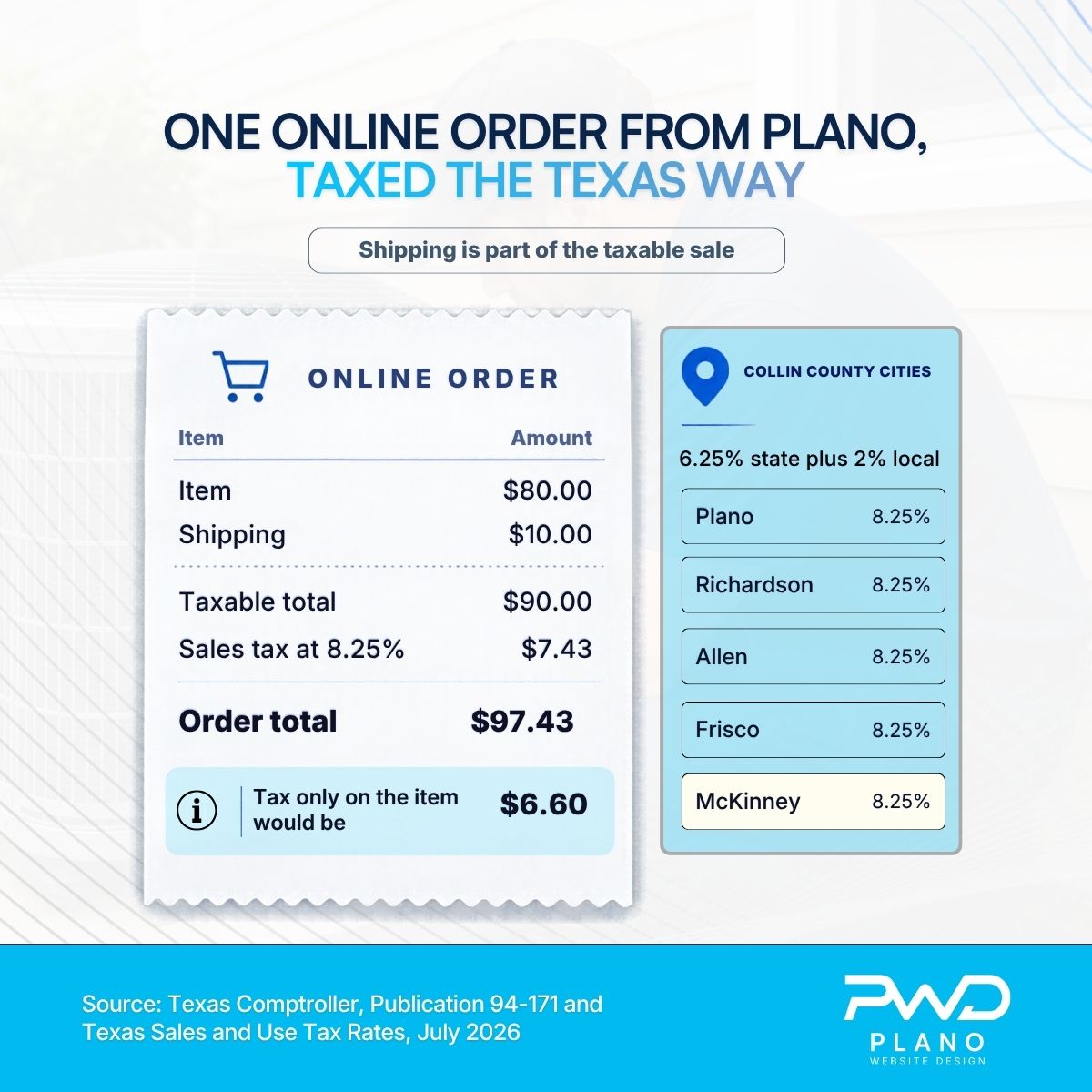
The state rate is 6.25 percent, and local jurisdictions can add up to 2 percent, for a maximum combined rate of 8.25 percent. Here is how the Comptroller’s July 2026 city rate table lists the towns around us:
| City | Local rate breakdown | Combined rate |
|---|---|---|
| Plano | 1% city plus 1% Dallas MTA (DART) | 8.25% |
| Richardson | 1% city plus 1% Dallas MTA (DART) | 8.25% |
| Allen | 2% city | 8.25% |
| Frisco | 2% city | 8.25% |
| McKinney | 2% city | 8.25% |
The same guide adds one wrinkle: when your location’s rate is lower than the rate where the buyer is, you also collect the additional local use tax due where the item is delivered. A store shipping from Plano already charges the 2 percent local maximum, so in practice there is no lower rate to make up. A store based somewhere with a lower local rate would need its checkout to handle that difference.
A worked example
Say a Plano boutique sells an $80 item and charges $10 for shipping to a customer in Denton. Under the same Comptroller guide, tax applies to the $90 total because shipping is part of the sale, so the customer pays $7.43 in sales tax at 8.25 percent. If the store only taxed the $80 item, it would collect $6.60 and come up short on the tax due on the shipping charge.
Orders shipped out of Texas
The Comptroller says a Texas seller does not collect Texas sales tax on items shipped and delivered to other states, as long as its records show proof of delivery, such as a bill of lading, a shipping invoice, or a postal receipt. Your store should save that record automatically for every out-of-state order.
The guide also warns that a Texas seller may owe tax in another state, depending on its activity there. That question belongs to each state’s tax agency and to your accountant, not to your web designer, but your store’s tax settings need to be able to follow whatever answer you get.
Selling on Amazon, Etsy, or eBay too
Marketplaces are handled differently. The Comptroller says a marketplace provider engaged in business in Texas, such as Amazon, eBay, Walmart Marketplace, or Etsy, collects and remits tax on sales made through it, based on the shipping destination. A Texas seller that also sells through a marketplace still needs a Texas tax permit and still has to file its returns on time.
The Remote Seller Rules You Keep Reading About Do Not Apply
A lot of what turns up in a search for Texas online sales tax is written for out-of-state companies. The Comptroller’s page on remote sellers and Texas use tax describes two rules that sound useful and are not available to a Plano business:
- The $500,000 safe harbor: The same page says out-of-state sellers with less than $500,000 in Texas revenue over the past twelve months do not need a Texas permit. A business with a physical presence in Texas is not a remote seller at all.
- The 1.75 percent single local use tax rate: Remote sellers can choose this flat local rate instead of each destination’s local rate. The Comptroller states that businesses located in Texas cannot use it.
Plenty of store owners in Collin County install a tax plugin, see a “remote seller” option, and switch it on because the rate looks lower. That setting is not for them.
One small benefit does apply. The Comptroller’s sales tax page says permitted taxpayers can claim a discount of 0.5 percent of the tax they report and pay on time.
Payments: What They Cost and Who Holds the Card Data
Card processing is a percentage plus a fixed fee on each order. Stripe’s pricing page, for example, lists 2.9 percent plus 30 cents per successful transaction on domestic cards. On the same $80 order, that works out to about $2.62, and the fixed 30 cents is why small orders cost proportionally more to process than large ones.
The fee matters less than where the card number goes. Our advice is to have customers enter the card on the payment processor’s own hosted form or embedded field, so it never lands on the store’s server. That keeps the most sensitive data out of your hosting account, your backups, and your database.
The PCI Security Standards Council, which sets the card security rules, publishes a list of questions small merchants should ask their vendors. For payment processors, gateways, and e-commerce payment service providers, its advice is to ask for their PCI DSS Attestation of Compliance and whether that assessment covered the service you are using. Those are two questions worth asking before you sign.
| Question | Who to ask | What a good answer looks like |
|---|---|---|
| Do you have a current PCI DSS Attestation of Compliance? | Payment processor or gateway | Yes, with a date, and it names the product you will use |
| Does card data ever touch our web server? | Your developer | No, cards are entered on the processor’s hosted field |
| Who applies security updates to the store software? | Your developer or platform | A named person, on a stated schedule |
| Where are order records and backups stored? | Your host or platform | Off the web server, in an account you own |
The Council’s small merchant page lists unpatched software as one of the leading causes of payment data breaches. So the payment decision does not end at launch. Someone has to keep the store software current, week after week.
Shopify or WooCommerce for a Collin County Store
We build on both, and the right choice depends on who you want responsible for the platform.
| Shopify | WooCommerce on WordPress | |
|---|---|---|
| Hosting | Included in the subscription | Your own hosting account |
| Platform updates | Handled by Shopify | Handled by you or your maintenance plan |
| Content and blog | Built-in, simpler | Full WordPress publishing tools |
| Customization | Theme- and app-based | Open code, any plugin or custom feature |
| Ongoing cost shape | Monthly subscription plus apps | Hosting, plugin licenses and maintenance |
| Best fit | Product-first stores with a small team | Businesses where content and services matter as much as products |
A retailer in the shops around Legacy West that mostly needs a clean catalog and checkout usually does well on Shopify. A business in Allen or McKinney that sells products alongside services, bookings and a lot of written content often fits WordPress better, where our WooCommerce builds on WordPress keep the store and the rest of the site in one system.
Neither platform removes the tax and payment questions above. Both need the same product data, photos, and shipping rules, which is where the build time actually goes.
Where the Build Hours Actually Go
Store projects rarely run long because of design. They run long because of data. These are the tasks that decide the timeline, roughly in the order they come up:
- Product data: Titles, descriptions, prices, variants such as size and color, SKUs and stock counts, usually cleaned up from a spreadsheet or a point-of-sale export.
- Product photos: consistent size, background, and lighting, with every variant shown.
- Shipping rules by weight, zone, or flat rate, plus local pickup if you have a storefront.
- Tax settings that match the Comptroller rules above, tested with a Texas address and an out-of-state address.
- Policy pages for returns, shipping, and privacy, written in plain language.
- Order emails for confirmation, shipping, and refunds, with your branding and correct contact details.
- Test orders on every payment method, including a refund.
- Redirects from any old store URLs, so existing product links keep working.
The first two items usually take longer than the owner expects, and they are the two nobody else can do for you without your input. If your product list is already clean and your photos are shot, the build moves quickly.
What to have ready before the kickoff
A store build starts faster when the owner arrives with a few decisions already made. This is the short list we would ask for in the first meeting:
- A product spreadsheet, even a rough one, with every item, its variants, and its price.
- A decision on shipping: flat rate, by weight, free over a threshold, or local pickup only.
- The name of the payment processor you want, or a willingness to let us recommend one.
- Your return and exchange terms, in your own words, so the policy page matches what you actually do.
- A list of any old store or marketplace URLs that customers already use.
None of these needs to be perfect. A rough answer on day one is worth more than a polished one in week six, because every one of them feeds a setting somewhere in the store.
On price, our home page says ecommerce and custom-built platforms start at $15,000, compared with $3,500 to $6,000 for a foundational business site on the same price list. The gap is mostly the two lists above.
Getting Products Into Google Search and Maps at No Cost
Once the store is live, Google Merchant Center is the next step. Google’s help page on free listings for products says eligible products can appear at no cost on Google Search, Google Maps, Gemini, YouTube, the Shopping tab, Google Images, and Google Lens.
A few details from that page shape how we build the store:
- Free listings point to product pages, not to the home page, category pages, or policy pages. Each product needs its own clean page.
- New Merchant Center accounts are opted in to free listings by default.
- In the United States, you are required to set up shipping settings in Merchant Center or add shipping costs to your product data.
- Google recommends adding your return policy, which can show next to your products.
- Being eligible does not guarantee your products will be shown. Google matches listings using the product data you provide.
That last point is why accurate product titles and descriptions matter twice: once for customers on your site, and again for the listings Google builds from your feed. If you plan to run paid Shopping campaigns later, the same product feed powers them, which is part of how we approach paid shopping campaigns for Plano stores.
Product pages also benefit from the same structured, well-labeled content we recommend for every page. We covered the basics in our guide to how structured data works on a small business site, and our organic search work for Plano businesses extends it to category and product pages.
Write Down Your Tax and Payment Setup Before the Store Build Starts
Before anyone quotes an ecommerce website, write three things on one page: where orders ship from, whether you sell anywhere else such as a marketplace or another state, and which payment processor you want. Then confirm with your accountant that you hold a Texas sales tax permit and how your returns are filed. Those answers decide how the store’s tax and payment settings are built, and changing them after launch is far harder than setting them once.
Gather your product spreadsheet and photos next, since they set the timeline. When you are ready to talk through the build, you can reach us at Plano Website Design. We build stores for retailers and service businesses across Plano, Allen, Frisco, McKinney, and Richardson.
 FAQs