

If you are asking whether your website needs to be ADA-compliant, the honest answer for a private business in Plano is that no federal regulation sets a technical standard for your site, but the ADA still applies. The Department of Justice says the law covers the goods and services a business open to the public offers online, and it leaves the method up to you. That gap between “no rulebook” and “still responsible” is where most small business owners get confused, so this guide covers what the duty is, what the government’s own deadlines mean for Collin County, and which fixes matter first.
Does my website need to be ADA compliant? For a business open to the public, the Department of Justice’s position is yes: Title III of the ADA reaches services offered on the web, even though no regulation sets a technical standard for private businesses. Businesses can choose how they make a site accessible, and the DOJ points to the Web Content Accessibility Guidelines (WCAG) as helpful guidance. State and local governments are different. They have a fixed standard, WCAG 2.1 Level AA, and a deadline that DOJ moved in April 2026 to April 26, 2027 for governments serving 50,000 or more people.
Across the most visited home pages online, the same six detectable failures account for nearly every error found, and the most common is low-contrast text. Overlay widgets do not settle the question: the FTC fined one overlay vendor for claiming its product could make any website compliant.
Does a Private Business Website Fall Under the ADA?
Yes, according to the Department of Justice. Its guidance on web accessibility and the ADA says Title III applies to businesses open to the public, and that its requirements cover the goods, services, privileges, and activities those businesses offer, including those offered on the web. The same page names retail stores, banks, hotels, medical offices, restaurants, and theaters as examples.
What the guidance does not give private businesses is a checklist. The DOJ states that it does not have a regulation setting out detailed standards for business websites, and that businesses can currently choose how they make online services accessible. It points to WCAG and to the federal Section 508 standards as existing technical references.
So the duty is real, and the method is open. For a small business, that sounds like freedom, and in practice it means you have to pick a yardstick yourself and be able to show you used it. Almost every team that takes this seriously picks WCAG, because it is the standard the DOJ names and the one every testing tool reports against.
We are a web design studio, not a law firm. Nothing here is legal advice, and if you have received a demand letter, that is a conversation for an attorney.
Why the City of Plano Has a Deadline, and Your Business Does Not
Public bodies in Collin County are working to a deadline, and it is worth understanding why, because it shapes what vendors and contractors will be asked for. In April 2024, the DOJ adopted a rule under Title II of the ADA requiring state and local governments to make their web content and mobile apps meet WCAG 2.1 Level AA. The ADA.gov fact sheet on the Title II web rule now carries the revised dates from an interim final rule published on April 20, 2026.
| Who | Original compliance date | Current compliance date |
|---|---|---|
| State and local governments with 50,000 or more people | April 24, 2026 | April 26, 2027 |
| Governments under 50,000 people | April 26, 2027 | April 26, 2028 |
| Special district governments | April 26, 2027 | April 26, 2028 |
The City of Plano and Collin County are both far past the 50,000 line, so their date is April 26, 2027. School districts work differently. The fact sheet says an independent school district uses the population estimate in the most recent Census Small Area Income and Poverty Estimates, so Plano ISD, Frisco ISD, and the other independent districts around us each look up their own figure.
None of this binds a private company’s own website. It matters to local businesses for a different reason.
If you build or post content for a public body
The fact sheet is direct about contractors. When a state or local government uses a company to design, manage, or update its website, the content that company posts for the government does not fall under the third-party exception, and it would usually need to meet WCAG 2.1 Level AA. The same page says governments that contract with other entities to provide public services have to make sure those contractors follow Title II.
If your firm runs a booking tool, a payment page, a class registration form, or a content feed for a city department, a school district, or a county office anywhere from Richardson to McKinney, expect accessibility language in the next contract renewal. Having your own site in order is the easiest proof that you can deliver it.
What Is Actually Broken on Most Websites?
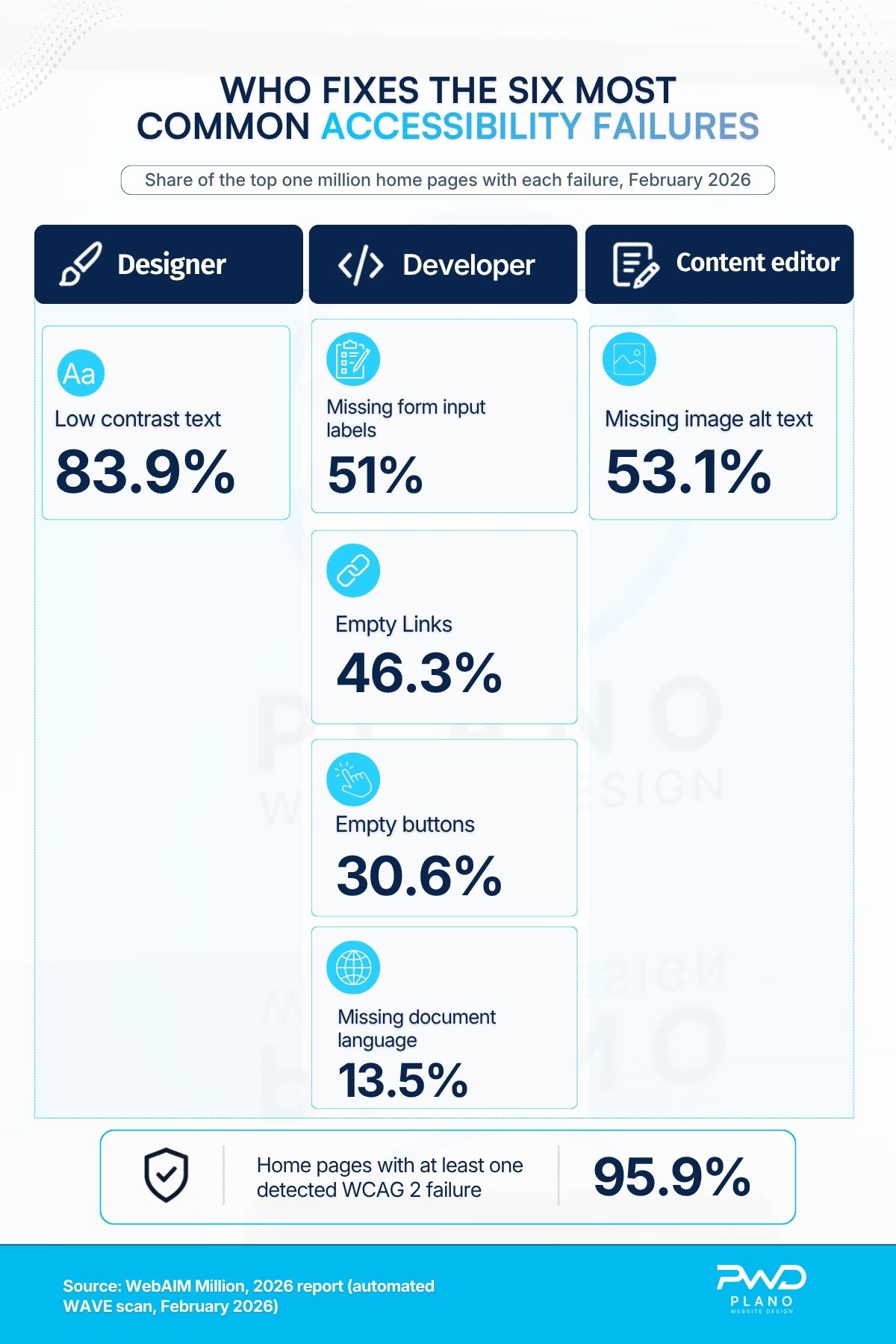
The most common failures are basic, and they have not changed in years. WebAIM’s 2026 Million report, an automated scan of the home pages of the top one million websites run in February 2026 by the accessibility group at Utah State University, found detectable WCAG 2 failures on 95.9% of home pages, up from 94.8% in 2025. It counted an average of 56.1 errors per page.
The same report found that 96% of every error it detected fell into six categories, and that those six have topped the list for seven years running.
| Failure | Share of home pages | What the visitor experiences | Who usually fixes it |
|---|---|---|---|
| Low contrast text | 83.9% | Gray on white is unreadable for low vision users and hard for anyone in bright sun | Designer, in the theme’s color tokens |
| Missing alternative text on images | 53.1% | A screen reader announces a file name or nothing | Whoever uploads images |
| Missing form input labels | 51% | A blind visitor hears “edit text” with no idea what goes in the box | Developer, in the form builder |
| Empty links | 46.3% | An icon link with no text is announced as “link” | Developer, in the theme |
| Empty buttons | 30.6% | A menu or search button with no name cannot be identified | Developer, in the theme |
| Missing document language | 13.5% | The screen reader may guess the wrong pronunciation rules | Developer, one line in the page template |
Look at the last column. Most of the list lives in the theme and the form builder, which means it gets fixed once and stays fixed, or it gets repeated on every page the theme produces. Alt text is the exception, because it depends on whoever adds images week to week.
WebAIM also broke results down by platform. WordPress home pages in the sample averaged 52.8 errors, slightly below the overall average, which tells you the platform is not the problem. The build decisions are.
More code is not the same as more access. The same report found that home pages using ARIA, the attributes meant to help screen readers understand custom controls, averaged 59.1 detected errors against 42 on pages without it. WebAIM is careful to say ARIA did not necessarily cause those errors, since the pages using it were also heavier. For a small business site, our takeaway is simple: plain HTML buttons, links, and form labels hold up better than custom widgets patched with attributes.
WCAG 2.1 or 2.2, and Which Level?
Aim for WCAG 2.2 Level AA. The W3C’s WCAG 2.2 recommendation, last updated December 12, 2024, states that it is backwards compatible with 2.1, so a page that conforms to 2.2 is at least as accessible as one that conforms to 2.1. The government rule names 2.1, and building to 2.2 covers it.
Level A is the floor, and Level AAA is rarely attempted for a whole site. Level AA is where the DOJ’s Title II rule sits and where nearly every audit reports.
Two AA criteria catch small business sites often:
- Contrast (1.4.3): Body text needs a contrast ratio of at least 4.5:1 against its background, and large text needs at least 3:1.
- Target size (2.5.8, new in 2.2): Tap targets need to be at least 24 by 24 CSS pixels, or spaced so a 24-pixel circle around each one does not touch its neighbor. Social icons crammed into a footer row fail this constantly.
WCAG 2.2 also added a rule that keyboard focus must not be hidden behind sticky headers, which matters for the next section.
Can an Accessibility Overlay Widget Make a Site Compliant?
No tool can promise that, and the federal government has said so in an enforcement action. In April 2025, the FTC approved a final order requiring accessiBe to pay $1 million over claims that its AI widget could make any website compliant with WCAG. The FTC called those claims false, misleading, or unsubstantiated.
The DOJ guidance is calmer about automated tools. It compares checkers and overlays to spelling and grammar checkers, warns that a clean report does not necessarily mean everything is accessible, and recommends pairing them with a manual review.
Our view as builders: a widget sits on top of the page, and the page underneath still has the unlabeled form and the empty button. Fix the source.
A Keyboard Test You Can Run This Afternoon
You do not need software to find the worst problems on your own site. Put the mouse away and try this on your home page, your main service page, and your contact or booking page.
- Press Tab from the top of the page. A visible outline or highlight should move to each link and button in a sensible order.
- Watch for the outline disappearing behind a sticky header or a chat bubble. That is a WCAG 2.2 focus problem.
- Open the main menu using only Tab and Enter. If a dropdown opens only on mouse hover, keyboard users cannot reach anything inside it.
- Fill in your contact form without the mouse. Check that every field has a visible label that stays put after you start typing, since placeholder text that vanishes is not a label.
- Submit the form with a required field empty. The error should say which field and what is wrong, in words, and not only by turning a border red.
- Zoom the browser in to double size and check nothing overlaps or disappears.
- Play any video on the page and confirm it has accurate captions.
The DOJ’s own list of barriers covers the same ground: poor contrast, color used alone to carry information, missing text alternatives, uncaptioned video, inaccessible forms and mouse-only navigation. If your pages pass the steps above, you have covered the parts of that list a person can check by hand.
Restaurants, Contractors and Clinics Carry Different Risks
The failure that matters most depends on what your site is for.
Restaurants
The menu is the page people came for, and many restaurants in Allen, Frisco and downtown McKinney still post it as a scanned PDF or a photo. A screen reader gets nothing from an image of text. An HTML menu page fixes that and reads better on a phone anyway, which is a point we made in our guide to online presence for Allen restaurants.
Home service contractors
For a roofer, plumber, or HVAC company, the quote request form is the business. An unlabeled field or a date picker that only works with a mouse loses the lead quietly. Our guide for Allen home services contractors covers the rest of that lead path.
Clinics and medical offices
The DOJ lists medical offices by name as businesses open to the public. Online booking, intake forms, and patient portals are the high-traffic pages, and they often come from a third-party vendor, so ask that vendor what standard they test against.
Anyone paying for clicks
Paid traffic raises the stakes. If you are sending ad clicks to a landing page through a Plano PPC campaign, every visitor who cannot complete the form is a click you paid for and lost.
Where the Fixes Live on a WordPress Site
On WordPress, accessibility problems come from four places, and each one has a different owner.
| Layer | Typical problems | Fixed by |
|---|---|---|
| Theme | Contrast in color settings, empty icon links and buttons, missing language attribute, focus outlines removed by CSS | Developer, once |
| Page builder and blocks | Headings chosen for size instead of structure, text placed over photos | Designer and editor |
| Plugins | Form plugins without proper labels, sliders that trap the keyboard, cookie banners that cannot be dismissed without a mouse | Developer, by swapping or configuring |
| Content | Alt text, link wording, captions on uploaded video | Whoever publishes, every time |
This is why accessibility is cheapest at build time. When we scope custom WordPress development, the theme and form layers are decisions made once. Retrofitting a finished site means auditing every template and every plugin after the fact.
It also overlaps with speed. Heavy sliders, piled-up scripts, and missing image dimensions show up in both accessibility reviews and how Core Web Vitals are measured, so one cleanup often improves both.
If a rebuild is on the table anyway, fold accessibility into the same project as the redirect map for a rebuild. Both are cheapest before launch, and both are painful to bolt on afterwards.
Fix Your Busiest Form First, Then Build Accessibility Into the Website Theme
Start where a failure costs you customers: the contact, quote, or booking form. Run the keyboard test on it today, check its labels and error messages, and confirm its button has a name. Then fix contrast in the theme’s color settings, since that single change repairs every page at once.
After that, work through alt text on your service pages, caption any video, and add a simple way for visitors to report a barrier, which the DOJ guidance lists as a practical step. Keep a dated note of what you tested and what you changed. With no fixed federal rule for private sites, a record of steady, good-faith work toward WCAG 2.2 AA is the most defensible position a small business can hold.
If your site is due for a rebuild, bring this list to the first meeting with whoever builds it, including us at Plano Website Design.
 FAQs