

When you compare a PPC landing page vs. homepage as the place to send paid clicks, the landing page wins for almost every service ad a Plano business runs. Your homepage has to speak to every visitor at once. A landing page answers the one search that triggered the ad, repeats the promise the ad made, and puts the call or form where a thumb can reach it. The help pages behind Google Ads describe the click this way: people expect to land on something relevant to the ad they saw, and when they don’t find it right away, they’re more likely to leave.
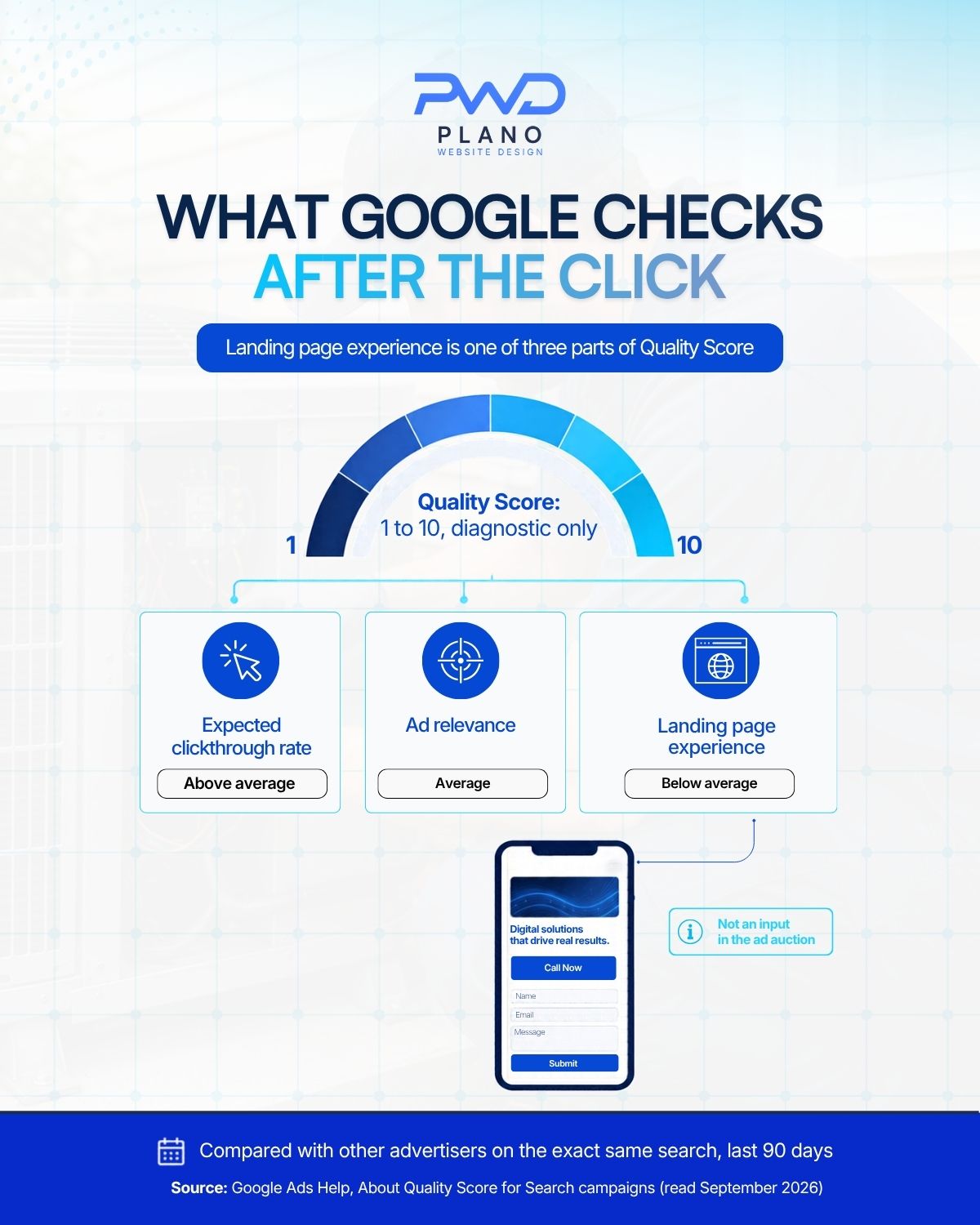
A PPC landing page vs homepage decision comes down to relevance after the click. Landing page experience is one of three parts of Quality Score, a 1 to 10 diagnostic that compares your ad and page with other advertisers who showed for the same search over the last 90 days. The score is not an input in the ad auction, by Google’s own account, so treat it as a symptom report, not a target. Need your Local Services Ads managed for you? See our Google Local Service Ads management.
A homepage serves every audience and every service at once, which is why paid visitors so often leave it. A dedicated page per advertised service should match the keyword, mirror the ad’s call to action, work on a phone, and carry original content. Thin cloned pages can be disapproved under Google’s destination requirements. Search campaigns that switch on AI Max can pick a better page from your site automatically, but only if that page exists.
What Does Google Measure After Someone Clicks Your Ad?
After the click, the thing being measured is how relevant and useful your landing page is to the person who clicked, and it reports that as “landing page experience”, one of the three components of Quality Score. The Google Ads Help page on Quality Score lists the other two as expected click-through rate and ad relevance. Each one gets a status of above average, average, or below average.
The comparison matters more than the number. Each component is graded against other advertisers whose ads showed for the same search over the last 90 days. So a Frisco plumber is being compared with the other plumbers bidding on “water heater replacement Frisco”, not with some abstract ideal.
| Quality Score component | What Google says it reflects | What a homepage usually does to it |
|---|---|---|
| Expected click-through rate | How likely the ad is to be clicked when shown | Little direct effect; this lives in the ad |
| Ad relevance | How closely the ad matches the intent behind the search | Neutral, until the page contradicts the ad |
| Landing page experience | How relevant and useful the page is to people who click | Drags it down when the page is about everything |
Two lines on that same help page change how you should read the score. Quality Score “is not an input in the ad auction”, the page says, and that it should not be optimized or aggregated with the rest of your data. It is a diagnostic. When landing page experience reads below average, the useful response is to fix the page, not to chase the digit.
Read it the way you’d read a check-engine light.
Five Ways a Homepage Loses a Paid Click
Picture a McKinney homeowner who searched for a slab leak repair, tapped your ad on a phone and landed on your homepage. Here is what usually happens next, matched against the checklist in Google’s own guidance on optimizing ads and landing pages.
- The headline talks about you, not their problem: Homepages open with a brand line. The guidance says to choose a landing page that closely matches your ad and keywords, and a slogan does not.
- The call to action is different from the ad’s: If the ad said “book a same-week inspection”, the page should show that booking form. The help page’s own example is blunt: an ad offering a free tour should land on a page with the sign-up form front and center.
- The service is three clicks away: A homepage lists every service you offer. The visitor has to find theirs in a menu, and Google warns against making people hunt for information.
- The important part sits below the fold: Google suggests putting important information toward the top of the page so it is visible without scrolling. On a homepage the top is usually a slider or a hero photo.
- The page is heavy on mobile: Homepages tend to carry the most scripts, video and carousels on the whole site. The same guidance points out that many of your customers will visit on a mobile device, where a cluttered page is harder to use.
None of this means your homepage is badly built.
It means it was built for a different job. A homepage greets people who already know your name. A landing page catches someone who knows only their problem and has about a second to decide whether you solve it.
What a homepage visit looks like from the ad account
When landing page experience shows “below average” on a service keyword, look at the final URL before you touch the bid. Check whether it points to the homepage, or to a general services page that covers eight trades at once. Either one makes the visitor do the sorting.
Why Speed on a Phone Changes the Math
Paid clicks cost money the moment they happen, so a slow page burns budget before the visitor has read a word. A separate Google Ads Help page, on evaluating landing pages, states that in retail, a one-second delay on mobile can cut mobile conversions by up to 20 percent. That figure comes from retail, and a Richardson HVAC company is not a retailer, but the direction is the same for anyone paying per click.
There’s a report for this inside the ad account. Here’s how to check the pages you are paying to send people to:
- In your Google Ads account, open the Campaigns menu, go to the reporting section and choose Landing pages.
- Read the “Mobile-friendly click rate” column. A figure short of every click means some visitors landed on a page that did not pass the mobile test.
- Sort by clicks to see which pages carry the most paid traffic.
- Open “View expanded landing pages” to check the real URLs people reached, including any tracking variants.
If the busiest page in that report is your homepage, and it also carries a slider, a chat widget and an autoplay video, that is the first thing to fix. The metrics behind page speed are covered in how Core Web Vitals are measured, and a landing page with one job is far easier to keep fast than a homepage with ten.
What Belongs on a Landing Page Built for Paid Traffic
Build one page per service you advertise, and give it exactly what the ad promised. The table below maps each element to the reason it earns its place.
| Element | What it looks like | Why it’s there |
|---|---|---|
| Headline that repeats the search | “Slab Leak Repair in Plano and Allen” | Google advises matching the page to your ad and keywords |
| One primary action, same as the ad | Call button or a short form, not both fighting for attention | Google advises mirroring the ad’s call to action |
| Tap-to-call phone number near the top | Visible without scrolling on a phone | Google lists “make it easy to contact you” for mobile |
| Service area in plain words | Named towns you actually serve, such as Plano, Frisco and Allen | Local searchers check whether you come to them |
| Proof from real customers | Reviews quoted with permission, never edited | Google suggests adding reviews that show real opinions |
| Original detail about the service | What the job involves, what the visitor needs to have ready | Google asks for useful, original content |
| Short navigation | A logo link home and a few essentials | Google says ease of navigation and the number of links on the page are part of the experience |
Notice what is missing.
There’s no company history, no full service menu, no blog feed. They belong on the site, just not on a page whose only job is turning one kind of search into one kind of lead.
One page per ad group, not one per keyword
You don’t need a page for every keyword variation. The advice in that help page is to group keywords by theme or product into tight ad groups, and each ad group can share one landing page. A roofing company might run separate ad groups for storm damage inspections, full replacements, and gutter work, each with its own page. The roofing digital marketing guide on our blog covers how those pages fit into a roofer’s wider marketing.
When the Homepage Is the Right Destination
Sometimes the homepage is the right answer.
A campaign bidding on your own business name should usually land there, because someone who typed your name already knows who you are and often just wants the phone number or directions.
The homepage also works when the business really does one thing. A single-service company in Allen whose homepage headline, form, and proof are all about that one service already has a landing page. It just happens to live at the root URL.
| Campaign type | Best destination |
|---|---|
| Searches for your business name | Homepage |
| A service you advertise by name | That service’s landing page |
| A town plus a service | A page for that service that names that town honestly |
| A seasonal offer | A page for the offer, taken down when it ends |
Can a Copy-and-Paste Landing Page Get Your Ads Disapproved?
Yes. The destination requirements policy lists “insufficient original content” as a reason for disapproval, and one of its examples is destination content copied from another source without adding original content or extra function. Pages built only to send users somewhere else, or to show ads, are named too.
That matters for anyone tempted to clone one page twenty times with the town name swapped. Five pages for Plano, Frisco, Allen, McKinney and Richardson that differ only by the city in the headline are thin, the same weakness that drags down cloned location pages in organic search.
| Destination requirement | What trips it on a small business site |
|---|---|
| Destination mismatch | The final URL redirects to a different domain, such as a booking tool on its own site |
| Destination not crawlable | A security plugin or firewall blocks Google’s AdsBot crawler |
| Destination not working | The page errors on some browsers or devices |
| Destination experience | Pop-ups and interstitials that make the page hard to use |
| Insufficient original content | Cloned pages, or pages that exist only to push people elsewhere |
The same policy page notes that these violations do not trigger an instant suspension: Google issues a warning at least 7 days before suspending an account.
That’s a small mercy, not a plan. Check new landing pages before the campaign goes live.
AI Max Will Pick a Page for You, If You Have Good Ones
Google introduced AI Max for Search campaigns on May 6, 2025, and the Google Ads and Commerce blog post announcing AI Max describes final URL expansion as a way to send users to the most relevant pages on your website. The matching help page says final URL expansion is turned on by default when you switch AI Max on for a campaign, and that it only sends traffic to URLs that are query-relevant and themed to your ad group.
Here is the catch for a small site.
The feature can only choose between pages that exist. If your site is a homepage, an about page and a contact page, there is nothing more relevant for it to pick, so paid traffic keeps landing on the same generic page. A site with a clear page for each service gives the system real choices. That is a website problem as much as an advertising one, which is why we plan the pages and the campaign together rather than handing the ad account a homepage and hoping the automation sorts it out.
Before switching it on, do three things:
- Add URL exclusions for pages that should never receive paid traffic, such as careers, privacy policy, and old blog posts.
- Check that every service page carries the same phone number and form the ad account tracks as a conversion.
- Expect pinned headlines to be ignored when a different URL is chosen. The help page says pinned responsive search ad assets aren’t used in that case.
Where Local Services Ads Fit
Local Services Ads work differently from Search ads. As our guide to Google Local Service Ads explains, customers call or message you straight from the ad, so there is no landing page to design. For plumbers, roofers, and HVAC companies, those leads often sit alongside a Search campaign, and the Search side is where a landing page earns its keep.
Pest control is a good example of a trade that runs both. Seasonal pests drive urgent searches, and a page per pest problem does more work than a general homepage. Our post on digital marketing for pest control
covers the rest of that mix.
Give Every Advertised Service a Page That Finishes the Ad’s Sentence
Open your Google Ads account this week and list every final URL your active ads use. Mark each one that points at the homepage for a service search.
For those, build a page that repeats the search in its headline, mirrors the ad’s call to action, loads fast on a phone and says something original about the job. Then check its landing page experience status again after it has collected some traffic.
If you want a second opinion on the ads or the pages behind them, our team handles PPC management for Plano businesses and builds the landing pages those campaigns point to. You can also start with a conversation with Plano Website Design about the pages you already have.
 FAQs