7950 Legacy Drive, Suite 400, Plano, TX 75024
  469-375-9656
  info@planowebsitedesign.com







Website builder vs. WordPress is really a question about year three, not launch week. Wix and Squarespace are quick to start and fine for a small site that will stay small. Shopify is built around selling products. Self-hosted WordPress takes more setup and gives you the most room to grow and the easiest exit. We read all four vendors’ own pricing pages on September 28, 2026, and the numbers below come from those pages, along with each company’s help documents on what you can export if you leave.
TL;DR
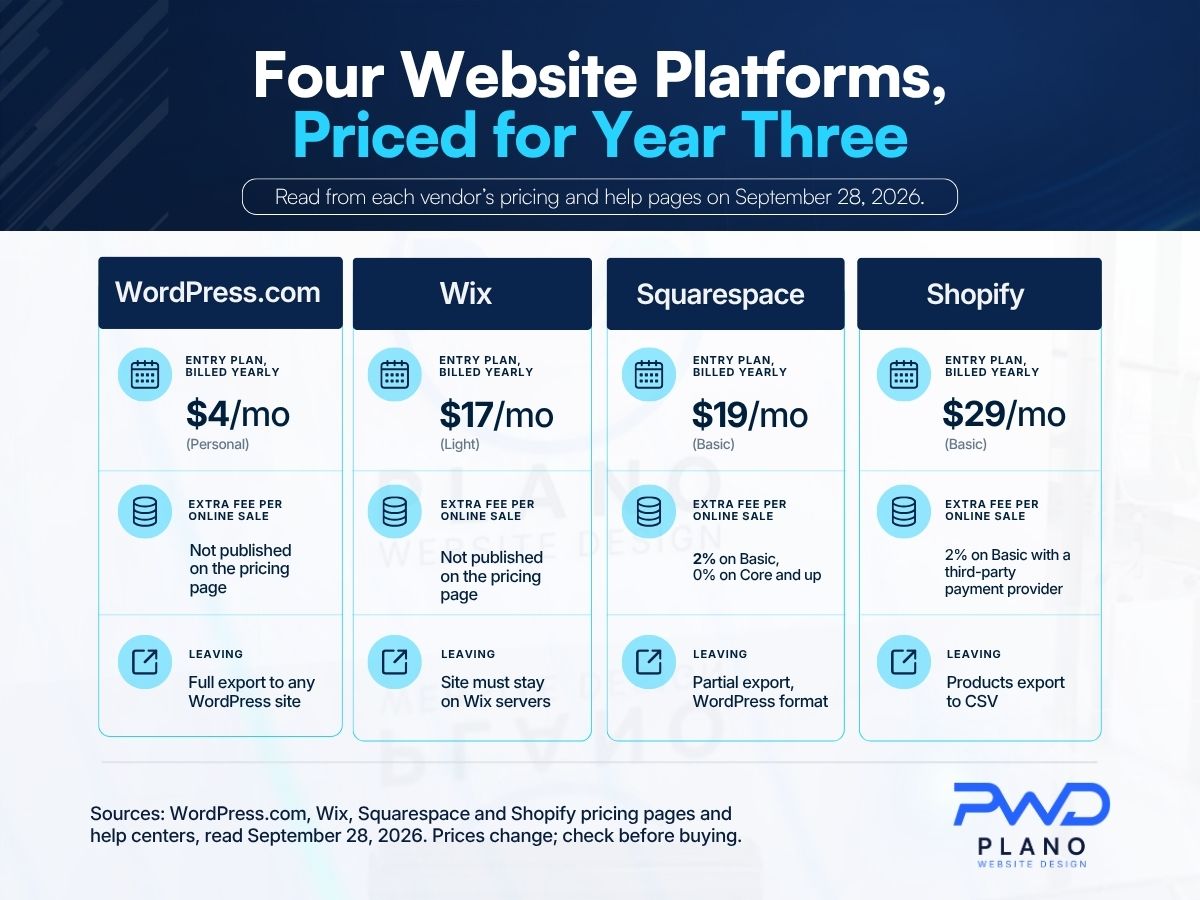
In the website builder vs. WordPress decision, price is rarely what forces a change later. Exits and fees are. On September 30, 2026, entry plans billed yearly were listed at $4 a month for WordPress.com Personal, $17 for Wix Light, $19 for Squarespace Basic, and $29 for Shopify Basic.
The differences show up when you sell or leave. Squarespace Basic adds a 2% transaction fee on online store sales, and Shopify adds 2% on its Basic plan when you use an outside payment provider. Wix’s help center says a Wix site has to run on Wix’s servers. Squarespace exports only some content, in a WordPress file format, and Shopify exports products to CSV.
A self-hosted WordPress site exports posts, pages, custom fields, categories, tags, and users to a file any other WordPress site can import. For a service business planning to add pages for years, that last point usually decides it.
Table of Contents
Four Pricing Pages, Read on September 30, 2026
Prices change often, so treat this table as a dated snapshot rather than a quote. We took every figure from the vendor’s own page on the morning of September 30, 2026: the WordPress.com plans page, the Wix plans page, the Squarespace pricing page, and the Shopify pricing page.
| Platform | Cheapest paid plan, billed yearly | Same plan, month-to-month | Top listed plan for selling |
|---|---|---|---|
| WordPress.com | Personal, $4 a month | $9 | Commerce, $45 a month yearly or $70 monthly |
| Wix | Light, $17 a month | Not shown on the plans page | Business Elite, $159 a month yearly |
| Squarespace | Basic, $19 a month | $25 | Advanced, $99 a month yearly or $139 monthly |
| Shopify | Basic, $29 a month | $39 | Advanced, $299 a month yearly or $399 monthly; Plus from $2,300 a month |
A few footnotes change how those numbers read.
- Wix says its prices “vary by location,” shows USD “for reference only,” and lists yearly subscriptions paid in full up front. A free Wix plan also exists.
- Shopify’s page offers a 3-day free trial and then $1 a month for the first 3 months before standard pricing starts.
- Squarespace includes a free custom domain for the first year on annual plans, and says the domain then renews at its standard rate.
- On WordPress.com, plugin installation is listed starting at the Personal plan, which is a bigger deal than it sounds, since plugins are how WordPress sites add features.
The promotions matter less than people think. An introductory month or a free domain covers year one. You will pay the regular rate every year after that, so compare the regular rates.
What Each Platform Takes From a Sale
If you sell anything online, the per-sale charges can outweigh the monthly fee within a few busy weeks. Two of the four pricing pages publish a clear per-sale schedule.
| Plan | Card rate online | Extra transaction fee |
|---|---|---|
| Squarespace Basic | from 2.9% + $0.30 | 2% on online store sales |
| Squarespace Core | from 2.9% + $0.30 | 0% |
| Squarespace Plus | from 2.7% + $0.30 | 0% |
| Squarespace Advanced | from 2.5% + $0.30 | 0% |
| Shopify Basic | 2.9% + $0.30 | 2% if you use a third-party payment provider |
| Shopify Grow | 2.7% + $0.30 | 1% with a third-party provider |
| Shopify Advanced | 2.5% + $0.30 | 0.6% with a third-party provider |
| Shopify Plus | 2.25% + $0.30 | 0.2% with a third-party provider |
Squarespace also charges a separate fee on courses and memberships: 7% on Basic, 5% on Core, 1% on Plus, and 0% on Advanced. Shopify’s third-party fee applies only when you skip Shopify Payments, and its page says the rate depends on your plan.
We did not find a per-sale fee schedule in the text of the WordPress.com or Wix pricing pages we read, so we have left them out of this table rather than guess.
The arithmetic for a small shop
Here is how that plays out for a Frisco gift shop selling $8,000 a month online. On Squarespace Basic, the 2% store fee comes to $160 a month on top of card processing. Core costs $10 a month more on an annual plan and charges 0%, so the upgrade pays for itself many times over at that volume.
The same logic applies on Shopify Basic with an outside payment provider: 2% of $8,000 is another $160 a month. Neither platform hides this. It is on the pricing page, in the fine print most owners skim.
Can You Take Your Site With You If You Leave?
Partly, and how much depends on the platform. This is the question almost nobody asks at signup, and it is the one that decides what switching costs you later. Each vendor’s own help documents answer it.
| Platform | What leaves in a file | What stays behind |
|---|---|---|
| Wix | A domain registered elsewhere can be connected | The site itself: Wix says it “must run on Wix’s servers” |
| Squarespace | Layout pages, one blog with its posts, text and image blocks, gallery pages, in a WordPress .xml file | Store pages, product blocks, video and audio blocks, drafts, style settings, custom CSS, any second blog |
| Shopify | Products, as a CSV file | The store design is not covered by the product export |
| WordPress | Posts, pages, custom post types, comments, custom fields, categories, tags, custom taxonomies, and users, in one export file | Themes and plugins are not on the export list |
What the help documents actually say
Wix’s help article on exporting explains that a Wix site uses Wix’s own technology and cannot be hosted elsewhere, while stating that the content you build belongs to you. Squarespace’s export guide says “not everything will export” because many features rely on its own code, and that you cannot export from a trial site at all. Shopify’s help center describes the product CSV as a backup or a way to move products to a new Shopify store, and notes that the SEO title and description columns come out blank unless you customized them. The WordPress.org documentation describes its export as a file that another WordPress site imports through its own import tool.
What a Squarespace to WordPress move looks like
Squarespace is unusually candid about this route, and its guide is worth reading before you sign up rather than after. It says that if you import the file into a self-hosted WordPress site using the WordPress Importer plugin, your images may not come across. The new site may pull only reference links to images still hosted by Squarespace, and those links stop working when you cancel the Squarespace site.
Suggested fixes are to import into WordPress.com, which copies the images to WordPress’s servers, or to download the images yourself and upload them to the new site. Only one blog comes across, so a business running two blogs has to pick one.
- Export while the Squarespace site is still active and published.
- Save every image separately before cancelling anything.
- Rebuild store pages, product blocks and video blocks by hand on the new site.
- Map every old page address to its new one before launch.
None of this makes Wix or Squarespace a bad choice. It means that leaving them is a rebuild, while leaving one WordPress host for another is a move.
Either way, the page addresses change when a site moves, and that is where rankings get lost. Our guide to what a website rebuild costs you in rankings covers the redirect map that protects them.
Hosted WordPress Plans and the WordPress Software Are Different Purchases
This trips up a lot of owners in Plano and Allen, because the names are nearly identical. WordPress.com is a company that sells the hosted plans in the table above. The WordPress software itself is listed on WordPress.org as free and open source, and you run it on whatever host you choose.
Running it yourself means your host has to meet the software’s requirements. The current recommendation on WordPress.org is PHP 8.3 or greater, MySQL 8.0 or greater or MariaDB 10.11 or greater, and HTTPS support. It says the software still runs on PHP 7.4 and MySQL 5.5.5, and that those versions have reached end of life and may expose a site to security problems.
- Ask any prospective host which PHP version your site will run on.
- Ask who applies updates to WordPress, the theme, and the plugins.
- Ask where backups are stored and how a restore is requested.
That is the trade. Self-hosting gives you the files, the database, and the choice of host, and it hands you the job of keeping them current. On our own builds, the client owns the domain, the hosting account, the design files, and the code, and we offer maintenance plans for the updates. When we scope how we plan and build WordPress sites, ownership and upkeep are settled before design starts.
Which Platform Fits Which Kind of Business?
Here is where we land, with the reasoning, for the kinds of businesses we meet most around Collin County.
| Business | Our usual pick | Why |
|---|---|---|
| A Plano HVAC or plumbing company adding service and town pages for years | WordPress, self-hosted | Unlimited pages, full control of URLs and content, and a clean export if you change hosts |
| A Frisco boutique with a few hundred products | Shopify | Built around catalog, checkout, and inventory, with published per-sale rates |
| An Allen photographer or consultant with five pages the owner edits | Squarespace or Wix | Fast to launch, low upkeep, and the export limits matter less on a small, stable site |
| A McKinney restaurant with a menu, hours, and a reservations link | Any of the four | Keep the menu as a real web page instead of a PDF or photo |
| A Richardson firm with gated resources and several editors | WordPress, self-hosted | User roles and custom content types without switching platforms later |
We build primarily on WordPress, and we also build on Shopify for ecommerce and on Webflow for design-heavy projects. We are not neutral about what fits a service business that plans to grow, and we would rather say so plainly.
Doing it yourself is a real option, too. If you are weighing a builder you run alone against hiring help, our honest guide for Allen business owners on DIY versus hiring walks through that choice. And if the site is for a business that has not opened yet, getting a Frisco business ranking before opening day covers what to have live before the doors open.
Five Questions to Settle Before You Sign Up
Answer these on paper before you pick a plan, whatever the platform. A salesperson can answer the first three for you in writing.
- Who owns the domain registration? It should be in the business’s name and account, not a designer’s.
- What will year three cost? Use the regular annual rate, not the introductory month.
- What does each online sale cost? Card rate plus any transaction fee, at your real monthly volume.
- What leaves with you if you switch? Check the vendor’s own export documentation, not a comparison chart.
- Who will make updates next spring? A builder you edit yourself and a WordPress site someone maintains are different commitments.
If an agency is quoting you a build, question one matters twice. Our piece on the real cost of a cheap website lists the ownership questions we would ask of any builder, including us.
Price the Platform for Year Three, Not the Month You Launch
Write down how many pages you expect to have in three years, whether you will sell online, and at what monthly volume. Then price each platform at its regular annual rate plus its per-sale fees at that volume, and read its export documentation before you commit. A small site that will stay small can live happily on Wix or Squarespace. A store belongs on a commerce platform. A service business that plans to add services and towns across Plano, Frisco, and McKinney is usually better served by a WordPress site it owns outright.
If you want a second opinion on the numbers, bring them to Plano Website Design, and we will go through them with you.