7950 Legacy Drive, Suite 400, Plano, TX 75024
  469-375-9656
  info@planowebsitedesign.com







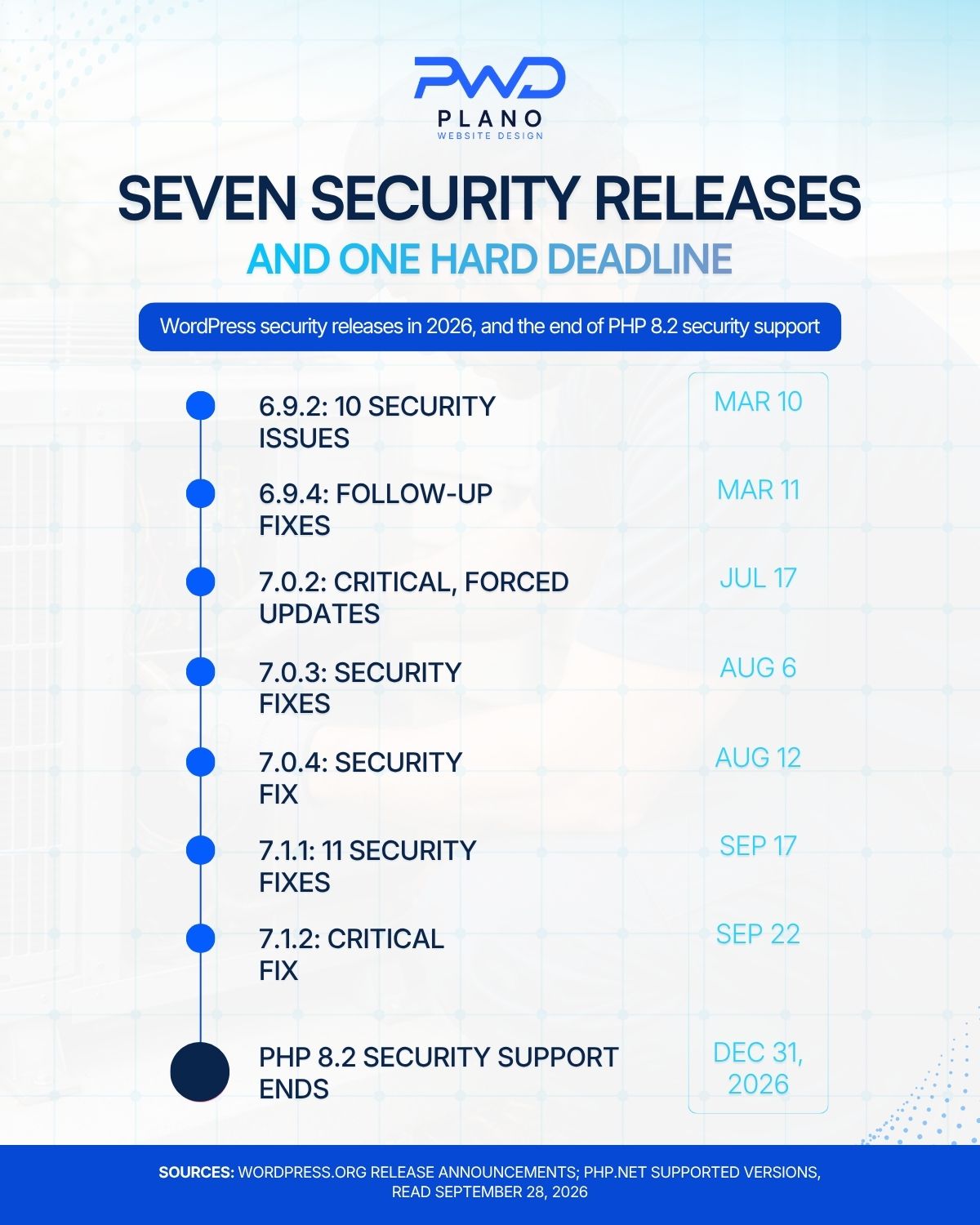
A website maintenance plan should cover five jobs every month: applying WordPress core, plugin, and theme updates within days of release, keeping the server on a PHP version that still gets security fixes, taking backups you have test-restored, watching uptime and page speed, and keeping a written log of what changed. For a small business in Plano, Frisco, or McKinney, that list is not theory. WordPress has shipped seven security releases since March 2026, and PHP 8.2, still common on shared hosting, stops receiving security fixes on December 31, 2026.
TL;DR
A website maintenance plan is only worth paying for if it names the work. The minimum for a WordPress site in 2026: core, plugin and theme updates applied promptly (WordPress released security fixes on seven dates between March 10 and September 22, 2026, and says only the most recent version is actively supported), a PHP version with security support (PHP 8.2 loses it on December 31, 2026, and WordPress now recommends PHP 8.3 or greater), off-site backups with a tested restore, uptime and speed monitoring on the pages that bring in leads, and a monthly change log. Texas adds a reason to take this seriously: a business that suffers a breach of certain personal data must notify affected people within 60 days, and the Texas attorney general within 30 days when 250 or more Texans are affected.
Table of Contents
What Does a Website Maintenance Plan Cover Each Month?
A useful plan is a list of tasks with a frequency next to each one. If the agreement you are looking at says “updates and security” and stops there, you cannot tell what you are buying or check whether it happened.
Here is the list we would expect any plan to spell out for a WordPress site. The frequencies are our working practice, not a legal standard.
| Task | How often | What it protects |
|---|---|---|
| WordPress core security releases | Within days of release | The whole site; WordPress rates some fixes critical |
| Plugin and theme updates | Weekly, tested first | Contact forms, booking tools, sliders, SEO plugins |
| PHP version review | Quarterly, and before each end-of-life date | The server layer every page runs on |
| Off-site backup | Daily for busy sites, weekly for brochure sites | Recovery after a bad update or a hack |
| Test restore | At least quarterly | Proof that the backup actually works |
| Uptime and form checks | Continuous uptime, monthly test submission | Leads that silently stop arriving |
| Speed check on key pages | Monthly | Mobile visitors and search visibility |
| Change log sent to you | Monthly | Your record of what was done and when |
Two lines on that table get skipped more than the rest: the test restore and the form check. A backup nobody has restored is a guess. A contact form that stopped emailing after a plugin update can cost a Richardson plumber a month of quote requests before anyone notices.
Seven WordPress Security Releases Since March
WordPress publishes every release on its own news site, and the 2026 record shows why “we update when we get to it” is not a plan. According to the WordPress release announcements, security fixes shipped on these dates:
| Release | Date | What the announcement says |
|---|---|---|
| 6.9.2 | March 10, 2026 | Addressed 10 security issues |
| 6.9.4 | March 11, 2026 | Some fixes in 6.9.2 and 6.9.3 had not been fully applied, so a follow-up was shipped |
| 7.0.2 | July 17, 2026 | One critical and one high-severity issue; WordPress.org enabled forced updates |
| 7.0.3 | August 6, 2026 | Several security fixes |
| 7.0.4 | August 12, 2026 | A security fix |
| 7.1.1 | September 17, 2026 | 11 security fixes plus 36 bug fixes |
| 7.1.2 | September 22, 2026 | A fix for a critical severity vulnerability |
The September 22 release is the one to read closely. WordPress says an unauthenticated attacker could, under certain conditions, make page template resolution load a PHP file outside the theme directories, which can lead to remote code execution when the server and theme meet the preconditions. The same post notes that only the most recent version of WordPress is actively supported, even though this fix was backported to older branches as a courtesy.
Look at the March entries too. A security release went out, and the next day the WordPress security team found that not all of the fixes had fully applied. A plan that updated on March 10 and then stopped checking would have missed the second release.
What “automatic updates” does and does not handle
The release posts say sites that support automatic background updates will start the update on their own. That helps with core. It does nothing for a premium plugin whose license has lapsed, a theme a developer customized directly, or a host with background updates switched off. Someone still has to look.
The PHP Deadline on December 31, 2026
PHP is the programming language WordPress runs on, and each version has an expiration date. The PHP supported versions table says every branch gets two years of active support and then two more years of fixes for critical security issues only. After that, it gets nothing.
| PHP branch | Released | Security support ends |
|---|---|---|
| 8.2 | December 8, 2022 | December 31, 2026 |
| 8.3 | November 23, 2023 | December 31, 2027 |
| 8.4 | November 21, 2024 | December 31, 2028 |
| 8.5 | November 20, 2025 | December 31, 2029 |
Anything older than 8.2 is already off the table. WordPress’s own requirements page now recommends PHP 8.3 or greater, and it says a site can still run on PHP 7.4, but that those older versions have reached end of life and may expose the site to security vulnerabilities.
So the practical question for a business site in Allen or Plano is simple: what version is your host running? You can usually see it under Tools, then Site Health, in the WordPress dashboard. If it says 8.2 or lower, the plan you pay for should include moving it before the end of December, with a staging copy tested first, because old plugins sometimes break on a newer PHP version.
This is also the job most often left out of cheap plans. Clicking “update” on plugins is easy to sell. Changing the server’s PHP version, finding the one plugin that throws errors on 8.3, and replacing it takes a person who knows the stack.
How a PHP move should run
A PHP upgrade is a small project, not a button. Done carefully, it follows the same order every time:
- Copy the live site to a staging site on the same host.
- Switch only the staging copy to the new PHP version, such as 8.3 or 8.4.
- Click through every page type: home, a service page, a blog post, the contact form, and any booking or checkout flow.
- Turn on error logging on staging and read what it records while you click.
- Update or replace any plugin or theme that logs errors, then test again.
- Take a fresh backup of the live site, switch its PHP version, and repeat the same clicks within the hour.
- Record the old version, the new version, and the date in the change log.
Most sites built in the last few years move without trouble. The ones that break tend to rely on a plugin nobody has updated in years, and that is worth knowing now rather than in January, when the old version is already out of support.
For a service business in McKinney or Frisco, the whole move is usually an afternoon of work when nothing breaks. When something does break, it is far better to find out on a staging copy in October than on the live site the week a customer is trying to book.
Backups You Have Restored at Least Once
Every maintenance plan says “backups.” Fewer can tell you when they last restored one. Here is how we would want the backup part of a plan to work, step by step:
- A full copy of files and the database is taken on a schedule that matches how often the site changes.
- That copy is stored somewhere other than the web server, so a hacked or failed server does not take the backups with it.
- Several past versions are kept, because a problem found on Friday may have started the Monday before.
- A restore is run to a staging site on a set schedule, and the result is written in the change log.
- A backup is taken immediately before every major update, so rolling back is minutes, not a rebuild.
We also want the client to own the account the backups live in. Our home page says clients own the domain, the hosting account, the design files, and the code when we build a site, and backups belong on that list. If you part ways with a vendor, you should not have to negotiate for a copy of your own website.
Monitoring Speed and the Pages That Bring In Leads
Uptime monitoring tells you the site is reachable. It does not tell you the quote form still sends email, or that a plugin update added two seconds to the service page that most of your Frisco customers land on.
So the monthly check should cover real pages: home, the top service pages, and the contact page, tested on a phone. Our guide to how Core Web Vitals are measured explains what Google looks at.
When a Breach Becomes a Legal Deadline in Texas
Most small business sites never store the kind of data that triggers Texas breach law. Some do, and owners are often surprised to find out their site is one of them. Chapter 521 of the Texas Business and Commerce Code sets the rules.
The law defines “sensitive personal information” to include a person’s name combined with a Social Security number, a driver’s license or government ID number, or a financial account or card number together with the code needed to use it. It also covers information that identifies a person and relates to their health or health care. A clinic intake form, a job application that asks for a license number, or a payment setup that stores card data on your own server can all fall inside it.
| If a breach involves sensitive personal information | What Chapter 521 requires |
|---|---|
| Notice to each affected person | Without unreasonable delay, and no later than the 60th day after you determine the breach occurred |
| Notice to the Texas attorney general | No later than the 30th day, if at least 250 Texas residents are affected, filed on the attorney general’s online form |
| More than 10,000 people notified at once | Also notify the nationwide consumer reporting agencies |
| Failure to notify | Civil penalty of up to $100 per person per day, capped at $250,000 for one breach |
The same chapter says a business must keep reasonable procedures to protect this information. We are web builders, not lawyers, so read this as a reason to ask questions rather than as legal advice. The first question: does our website collect or store anything on this list at all? The best answer is often to stop storing it by moving payments to a hosted processor and sending sensitive intake through a system built for it.
Questions to Ask Before You Sign a Maintenance Agreement
Most maintenance agreements are short, and the gaps are in what they leave unsaid. Bring this list to the conversation:
- Which updates are included, and are premium plugin licenses renewed by you or by us?
- How soon after a WordPress security release is it applied?
- Is the PHP version upgrade included, and when is it planned for this site?
- Where are backups stored, who owns that account, and when was the last test restore?
- Is there a staging site for testing updates, or do updates go straight to the live site?
- What does the monthly report show, and which pages are checked?
- If the site is hacked, is cleanup included or billed separately?
- How many hours of content changes are included, if any?
A plan priced far below the rest usually drops the staging site, the restore test, or the PHP work, which are the three tasks that take real time. We wrote about that pattern in the real cost of a cheap website, and the same logic applies to monthly care.
On our side, our WordPress support and development work covers updates, security, and ongoing maintenance for the WordPress sites we build, and our home page lists what the maintenance plans include: security updates, plugin patches, performance monitoring, content refreshes, and periodic backups.
When a Rebuild Beats Another Year of Patching
Sometimes the honest answer is that maintenance cannot fix the site. Three situations come up again and again:
- The theme was abandoned by its developer and customized so heavily that it cannot be updated at all.
- The site depends on a plugin that has not been updated in years and breaks on any supported PHP version.
- The site was built on a page builder that loads so much code that no amount of tuning gets the service pages fast on a phone.
In those cases, paying monthly to keep an old site limping along costs more over two years than rebuilding it once. If you do rebuild, plan the move carefully, because a rebuild done without a redirect map can erase years of rankings. Our article on why a rebuild loses rankings walks through what to protect.
Start Your Maintenance Review With the PHP Version
Open your WordPress dashboard, go to Tools, then Site Health, and look for the PHP version on the Info tab. If it reads 8.2 or lower, that is your first maintenance task for this quarter, because PHP 8.2 stops receiving security fixes on December 31, 2026.
Then ask whoever maintains your site for three things in writing: the date the last WordPress security release was applied, the date of the last test restore, and the list of pages checked each month. If those answers come back quickly and specifically, your plan is doing its job. If they do not, we are glad to look at the site with you. You can reach us through Plano Website Design, and we work with businesses across Plano, Allen, Frisco, McKinney, and Richardson.